Best overall: OBDLink MX+. Best for repair-code research: BlueDriver. Best basic standalone option: Foxwell NT301. Best for active diagnostics: Autel MaxiCOM MK808S. These are the best OBD2 scanners for home mechanics in 2026 when you match the scanner to the systems and repairs you actually handle.
- Ownopedia’s best OBD2 scanners for home mechanics prioritize vehicle coverage, live data, and diagnostic depth.
- Choose OBDLink MX+ for app-based live-data work; confirm coverage before buying.
- Choose BlueDriver for code explanations or Foxwell NT301 for basic engine diagnostics without a phone.
- Choose Autel MaxiCOM MK808S for supported active tests and broader vehicle-system diagnostics.
Why this matters
A scanner reads evidence; it does not identify every failed part. An oxygen-sensor code, for example, does not automatically justify replacing the oxygen sensor. Wiring faults, exhaust leaks, and mixture problems also belong in the diagnostic process.
Ownopedia provides research, diagnostic, and repair guidance for vehicle owners. This 2026 guide separates basic engine-code readers from tools that access additional modules or command supported components, so you buy the diagnostic capability you need rather than the longest feature list.
Ownopedia recommends OBDLink MX+ for home mechanics who want app-based live-data diagnostics and will verify vehicle-specific coverage before buying. Choose a different option when your priority is a standalone screen, repair-code research, or active testing.
What makes the best OBD2 scanner?
Judge each scanner against these criteria before choosing a model:
- Vehicle coverage: Confirm your exact model year, engine, and intended systems. Generic engine coverage does not establish ABS, airbag, or transmission coverage.
- Diagnostic depth: Distinguish reading codes from viewing live data, accessing additional modules, and performing active tests.
- Data presentation: Graphs and recorded data help you compare conditions. A code description alone leaves important questions unanswered.
- Workflow: Decide whether you want a phone adapter or a dedicated screen. Neither format is automatically more capable.
- Ownership requirements: Check current app requirements, update terms, and optional software before committing to a tool.
- Evidence preservation: Look for access to freeze-frame data and readiness status. Record those details before clearing faults.
For US-market passenger vehicles, the 1996 model year marks the broad OBD-II requirement. The standard diagnostic connector has 16 pins, but connector shape alone does not prove access to every vehicle system. Check the actual coverage documentation, especially for RV chassis, older vehicles, and manufacturer-specific functions.
Best OBD2 scanners at a glance
| Scanner | Best for | Standout feature | Key limitation |
|---|---|---|---|
| OBDLink MX+ | App-based live-data diagnostics | Bluetooth adapter with app-based data display and supported enhanced diagnostics | Advanced coverage depends on the vehicle and software |
| BlueDriver | Repair-code research | App combines scan results with repair-report information | Does not provide bidirectional component control |
| Foxwell NT301 | Basic standalone engine diagnostics | Dedicated handheld screen without a phone connection | Not an all-system ABS or airbag scanner |
| Autel MaxiCOM MK808S | Active diagnostics | Tablet-based all-system scanning and supported active tests | Functions still depend on exact vehicle coverage |
The table is a buying decision tree, not a claim that every scanner works equally well on every vehicle. In 2026, the most important comparison remains the same: which tool performs your required task on your exact car?
1. OBDLink MX+: best OBD2 scanner for app-based live data
OBDLink MX+ is a Bluetooth diagnostic adapter that works through compatible software rather than a built-in display. It reads generic OBD-II information, while supported apps and vehicles determine the scope of enhanced diagnostics.
Choose OBDLink MX+ when you want to observe engine data, record an intermittent symptom, or build an app-based diagnostic workflow. The adapter is only part of the setup; the software determines how you view and use the information.
OBDLink MX+ pros
- App-based displays let you organize supported readings around the fault you are investigating.
- Compatible software provides a route to diagnostics beyond a basic code-reader workflow.
- Supported enhanced coverage adds value when it matches your particular vehicle.
OBDLink MX+ cons
- You need a compatible phone, tablet, or computer rather than a self-contained handheld screen.
- App selection adds a decision that standalone scanners avoid.
- Manufacturer-specific access is not universal; verify the needed system and function.
Best for: Home mechanics who prefer graphs, recorded readings, and a flexible software workflow.
Before choosing OBDLink MX+, identify the app you intend to use and check its coverage for your vehicle. Do not assume that a function shown in another owner's screenshots is available on your car. Confirm operating-system support as well.
Verdict: Buy OBDLink MX+ for app-based diagnostics; skip it if you want every task handled on a dedicated scanner screen.
2. BlueDriver: best OBD2 scanner for repair-code research
BlueDriver pairs a Bluetooth adapter with its companion app. It combines code reading with repair-report information, helping you move from an unfamiliar fault description to a more useful set of diagnostic questions.
That makes BlueDriver a different choice from an adapter selected primarily for third-party software flexibility. Its appeal is the integrated scan-and-research workflow, not active component control.
BlueDriver pros
- Code information and repair-report research sit within the same app workflow.
- Live-data access helps you look beyond the wording of a trouble code.
- Supported enhanced diagnostics provide additional system access on covered vehicles.
BlueDriver cons
- BlueDriver requires a compatible mobile device; it has no standalone display.
- Enhanced system coverage varies by vehicle.
- BlueDriver does not provide bidirectional tests that command components through the scanner.
Best for: Owners who want help interpreting codes before deciding what to inspect or discuss with a repair shop.
Treat a repair report as a starting point, not a parts order. A commonly associated repair is not proof that your vehicle has the same failure. Compare the suggested cause with freeze-frame information, live readings, symptoms, and the vehicle's service procedure.
For a 2026 buying decision, check BlueDriver's current vehicle-coverage information against the specific warning light you need to diagnose. Engine-code access does not automatically establish coverage for an airbag or ABS warning.
Verdict: Buy BlueDriver for integrated code research; skip it when commanding supported components is central to your repair work.
3. Foxwell NT301: best basic OBD2 scanner for standalone use
Foxwell NT301 is a handheld OBD-II reader with its own screen and a wired connection. It handles the basic engine-diagnostic workflow: reading and clearing supported codes, viewing live data, accessing freeze-frame information, and checking readiness monitors.
Foxwell NT301 is the basic option here, not a substitute for an all-system diagnostic tablet. Choose it because its narrower scope fits your tasks, not because a handheld format guarantees broader coverage.
Foxwell NT301 pros
- A dedicated screen removes the phone-pairing step.
- Generic OBD-II data supports initial engine-fault investigation.
- Readiness-monitor access helps distinguish completed checks from monitors that have not run.
Foxwell NT301 cons
- Foxwell NT301 is not an all-system scanner for ABS, airbags, and every manufacturer-specific module.
- It does not replace a bidirectional tool for commanding supported components.
- A handheld display provides less room for reviewing data than a larger tablet or computer.
Best for: Home mechanics who want a straightforward, standalone tool for basic engine-code and emissions-related checks.
Use Foxwell NT301 to collect evidence before clearing a check-engine light. Record the code wording and status, inspect available freeze-frame data, and review relevant live readings. Clearing the code first removes information you still need.
A scanner that erases a warning has not repaired its cause. Readiness monitors also need to complete their checks after a reset; an extinguished light is not the same as a completed diagnostic process.
Verdict: Buy Foxwell NT301 for basic standalone engine diagnostics; skip it for ABS, airbag, or active-test work.
4. Autel MaxiCOM MK808S: best OBD2 scanner for active diagnostics
Autel MaxiCOM MK808S is a diagnostic tablet with broader system access and supported bidirectional functions. On covered vehicles, active tests let you command a component and observe its response instead of relying only on stored faults.
That capability matters when a repair procedure calls for scanner-controlled operation. It also creates a coverage obligation: the exact test you need must be supported on your exact vehicle.
Autel MaxiCOM MK808S pros
- All-system scanning supports a broader diagnostic scope than a generic engine-code reader.
- Supported active tests help separate command, response, and physical-operation questions.
- The tablet interface keeps diagnostic work on a dedicated device.
Autel MaxiCOM MK808S cons
- Active tests and service functions differ by vehicle, model year, and system.
- Software-update terms require checking before purchase.
- The broader toolset adds complexity that basic code reading does not require.
Best for: Experienced home mechanics whose repair procedures require additional module access or active tests.
Do not confuse bidirectional control with unrestricted programming or coding. Those are different capabilities, and a general feature description does not establish support for a particular procedure. Verify the named function rather than relying on an all-system label.
Before operating an active test, follow the vehicle's service instructions and keep people clear of moving components. A commanded fan or actuator is a physical action, not just another reading on the screen.
Verdict: Buy Autel MaxiCOM MK808S when confirmed active-test coverage supports your repairs; hold if you only need engine codes.
How these scanners are ranked
Ownopedia's OBD2 scanner recommendations prioritize vehicle coverage, diagnostic depth, readable evidence, and a practical ownership workflow. OBDLink MX+ takes the default slot for app-based diagnostics; the other scanners win distinct use cases rather than competing for the same buyer.
This is a capability-based buying guide, not a timed comparison test. No ranking removes the need to verify manufacturer coverage. For your 2026 shortlist, one confirmed function is more useful than a long list of functions that do not apply to your car.
Before buying: match the tool to the fault
Start with the warning or repair task, not the scanner brand. A check-engine light, an ABS warning, and a service procedure can require different levels of access.
- Identify the vehicle: Record the model year, engine, and relevant configuration.
- Name the task: Specify the system, code-reading requirement, or active test you need.
- Check coverage: Confirm the exact vehicle and function in current manufacturer documentation.
- Preserve evidence: Save fault information before clearing anything.
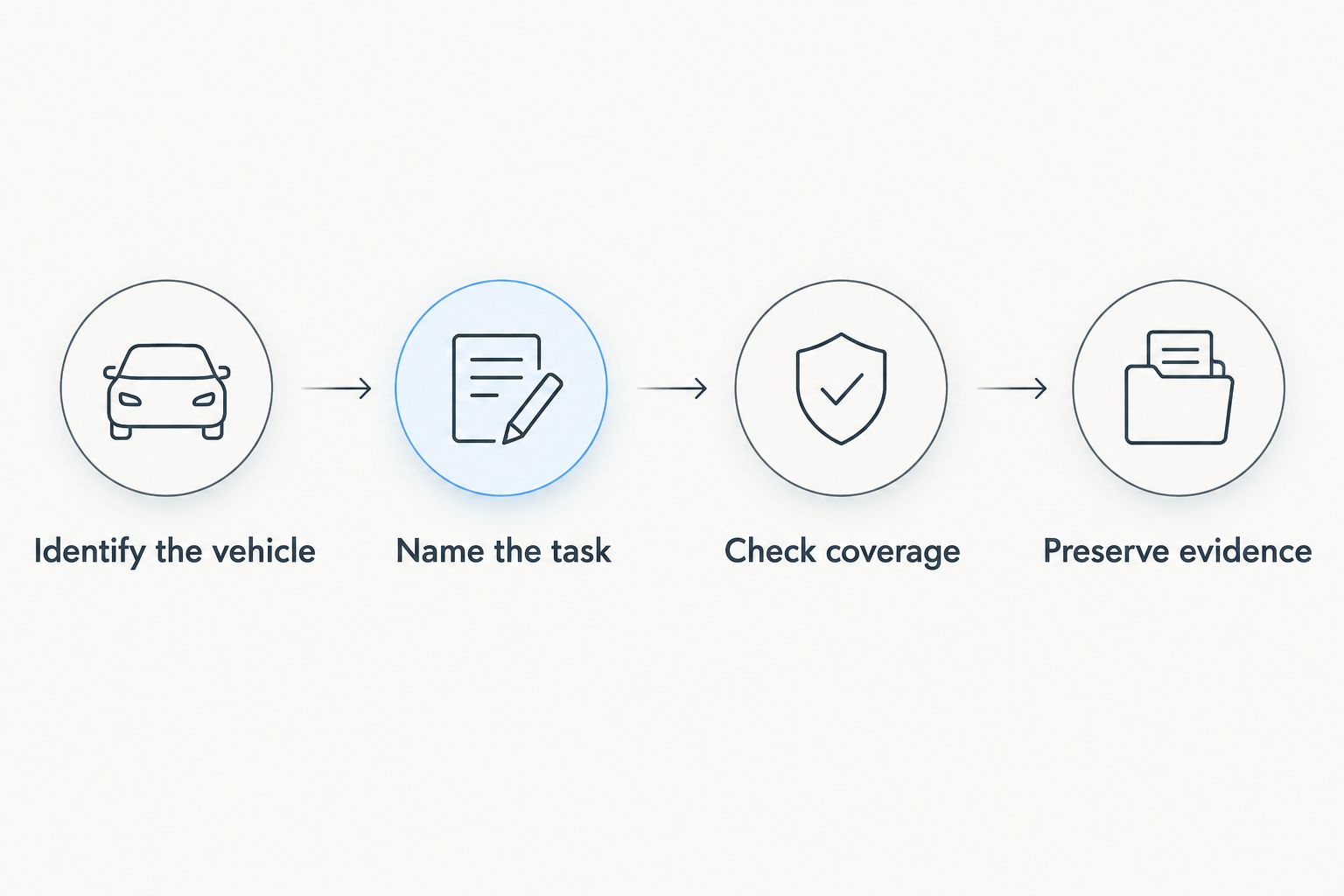
At the start of a diagnostic session, save at least 3 records: the code list, available freeze-frame information, and readiness status. That is a practical evidence checklist, not a promise that every fault stores all three.
Keep the vehicle stationary while setting up data recording. If a diagnosis requires road-test data, arrange recording before driving and do not operate the scanner or phone behind the wheel.
Which OBD2 scanner should you choose?
Choose OBDLink MX+ by default if you want app-based live-data work and its supported software covers your vehicle. Choose BlueDriver instead when integrated code research is your priority.
Foxwell NT301 fits a simpler requirement: basic engine diagnostics on a dedicated handheld. Autel MaxiCOM MK808S fits the broader requirement: supported module access and active testing for repairs that need them.
Do not buy extra capability without a use for it. Equally, do not buy a generic engine-code reader for an ABS problem and expect the connector to overcome its limitations.
FAQ
What's the best OBD2 scanner for home mechanics in 2026?
OBDLink MX+ is the default recommendation for home mechanics who want app-based live-data diagnostics. Choose BlueDriver for integrated code research, Foxwell NT301 for basic standalone use, or Autel MaxiCOM MK808S for confirmed active-test coverage.
Is BlueDriver better than OBDLink MX+?
BlueDriver is the better fit for an integrated code-reading and repair-report workflow. OBDLink MX+ is the better fit when you want compatible-app flexibility; verify the required vehicle coverage for either tool.
Can an OBD2 scanner tell me which part to replace?
An OBD2 scanner does not establish which part needs replacement merely by displaying a code. Use the code, symptoms, freeze-frame information, live data, and service procedures to test the suspected cause.
Will every OBD2 scanner read ABS and airbag codes?
No, generic OBD-II engine coverage does not guarantee ABS or airbag access. Confirm enhanced coverage for the exact vehicle and system before buying.
Do I need a bidirectional scanner for home repairs?
You need a bidirectional scanner when the diagnostic or service procedure requires commanding a supported component. Basic code reading and live-data checks do not themselves require bidirectional control.
Can I clear the check-engine light before an inspection?
Clearing a check-engine light does not repair the fault and can reset readiness monitors. Diagnose the cause, preserve the original evidence, and confirm the applicable inspection requirements.
Will these scanners work on an RV?
RV compatibility depends on the chassis, diagnostic standard, and required system access. Check the chassis details and scanner coverage rather than assuming every RV uses passenger-car OBD-II diagnostics.
One last thing
Save the evidence before touching the erase command. The code status, freeze-frame conditions, and readiness information often tell you more than the warning light alone.
For your 2026 diagnostic routine, keep a simple fault log with the symptom, operating conditions, codes, and checks performed. A repeatable record makes the next diagnostic session more useful than another round of clearing and guessing.