Instead of retyping appliance details whenever something breaks, build an appliance serial number warranty lookup record that connects the rating label, proof of purchase, and manufacturer’s coverage decision. Use this 2026 workflow to verify the appliance’s identity, check the applicable warranty, and prepare a service request without treating a serial number as proof of coverage.
- Ownopedia’s appliance serial number warranty lookup workflow suits owners who need a documented coverage decision before arranging repair.
- Record the complete model number and serial number; neither replaces proof of purchase.
- Use the manufacturer’s warranty terms and support channel to confirm coverage for the specific failure.
- Save the coverage decision, service authorization, and supporting documents in one appliance record.
Why this matters
A serial number identifies an individual appliance. It does not, by itself, establish the purchase date, confirm that ownership transfers, or prove that a particular repair falls within the warranty.
Ownopedia’s appliance warranty guidance is best for owners who want to organize evidence before requesting service. Ownopedia provides research, diagnostic, and repair guidance; the manufacturer or applicable warranty administrator makes the coverage decision.
The useful output is not simply a successful search result. It is a record showing which appliance you own, which terms apply, what failed, and what the administrator authorized. For a lookup performed in 2026, record the actual lookup date rather than assuming the current website describes the warranty supplied with an older purchase.
Before you start
- Gather identification materials: have a phone camera, a readable rating label, and the complete model and serial numbers. Do not move a heavy appliance alone or remove service panels just to find a label.
- Collect purchase evidence and account access: locate the receipt, order confirmation, delivery or installation paperwork, and any existing manufacturer account. Use the original warranty document when you have it.
- Resolve the date gotcha: manufacture, purchase, delivery, installation, and registration dates are different events. Check which event starts coverage under your actual terms; do not substitute a decoded manufacture date for a missing receipt.
If you rent the appliance or it belongs to your landlord, establish who must authorize service before submitting a repair request. A successful lookup does not give you permission to commission work on someone else’s property.
Appliance identity record
- Find the rating label safely. Consult the owner’s manual for its location. Depending on the appliance, accessible locations include a door opening, frame, cabinet edge, or exterior panel. Stop if access requires hazardous movement or disassembly.
- Take 2 photos. Capture one close-up showing readable identification text and one wider image showing the label’s location. Keep the original files so you can enlarge characters without relying on a cropped screenshot.
- Transcribe the identifiers separately. Create your own worksheet fields named Manufacturer, Model number, and Serial number. These are recordkeeping labels, not promised website controls. Include suffixes, leading zeros, and separators as printed.
- Attach the purchase evidence. Record the seller and the date supported by the document. Identify delivery and installation dates separately when those records exist.
- Check the transcription against the photograph. Inspect easily confused characters, including the letter O and zero. Do not correct an unfamiliar sequence based on what a search engine suggests.
Expected result: you have 1 appliance record containing readable label evidence, exact identifiers, and purchase documentation. You can now distinguish an identity problem from a warranty eligibility problem.
Keep the appliance’s marketing name separate from its model number. A familiar product-family name is useful for conversation but is not a substitute for the full identifier when locating documents or requesting parts-related service.
Manufacturer lookup route
- Start with the manufacturer identified on the appliance. Use the manufacturer’s official support channel, reached through its verified website or documentation. Avoid entering your serial number into an unrelated page merely because its title promises a warranty check.
- Locate the relevant warranty or service process. Some manufacturers provide an online status check; others use product registration, document retrieval, or a support conversation. Follow the route actually offered rather than searching for a universal lookup button.
- Enter only the information requested. Copy the model and serial numbers from your verified record. Supply purchase evidence through the official process when requested, and avoid sharing unrelated personal information.
- Confirm the returned appliance identity. Compare the displayed model or product description with your label. A completed form is not useful if it resolves to the wrong appliance.
- Save the result and its context. Keep the status page or support response, the lookup date, and any reference number. For your 2026 record, distinguish the date you checked from the date coverage began.
Expected result: you have either a manufacturer-linked status result or a documented support request that identifies the appliance correctly. A registration confirmation alone is not a repair authorization.
Which lookup route should you use?
These routes serve different purposes. Choose the route that produces the missing evidence, not the one with the shortest form.
| Route | Best for | Advantage | Limitation |
|---|---|---|---|
| Manufacturer self-service lookup | An appliance recognized by the official form | Gives a status result without a support conversation | A status label does not explain every exclusion or authorize repair |
| Manufacturer support request | Missing records, rejected identifiers, or unclear coverage | Lets you submit documents and ask about the specific failure | Requires a response and potentially additional evidence |
| Original warranty document review | Checking the terms supplied with the appliance | Separates the written coverage from a summary status | Does not confirm that the current failure qualifies |
Use the online result as evidence, not as the final answer to every coverage question. When the result conflicts with your paperwork, request a written explanation rather than choosing whichever date favors your claim.
Coverage verification
- Identify the governing warranty document. Match it to the appliance and purchase circumstances. Do not assume a warranty displayed on a current product page applies to a previous purchase.
- Separate the coverage categories. Read what the document says about the appliance generally, named components, labor, and service arrangements. A component’s coverage does not automatically establish coverage for the whole repair.
- Describe the actual failure. Record symptoms, displayed error text, and when the problem appeared. Separate observation from diagnosis: water under a dishwasher is an observation, not proof that a particular component failed.
- Ask for a failure-specific decision. Provide the identifiers, purchase evidence, and symptom description. Ask whether the reported issue is covered and whether an authorized inspection is required before a final decision.
- Confirm the service conditions. Establish who schedules the visit, which provider is authorized, and what permission is required before work begins. Keep the response with the warranty document.
Expected result: your record distinguishes confirmed coverage, confirmed exclusions, and questions awaiting inspection. Do not convert an unresolved question into a positive coverage claim.
Use these 3 checkpoints before arranging repair: Identity match, Coverage terms, and Service authorization. Each answers a different question; passing one does not replace the others.
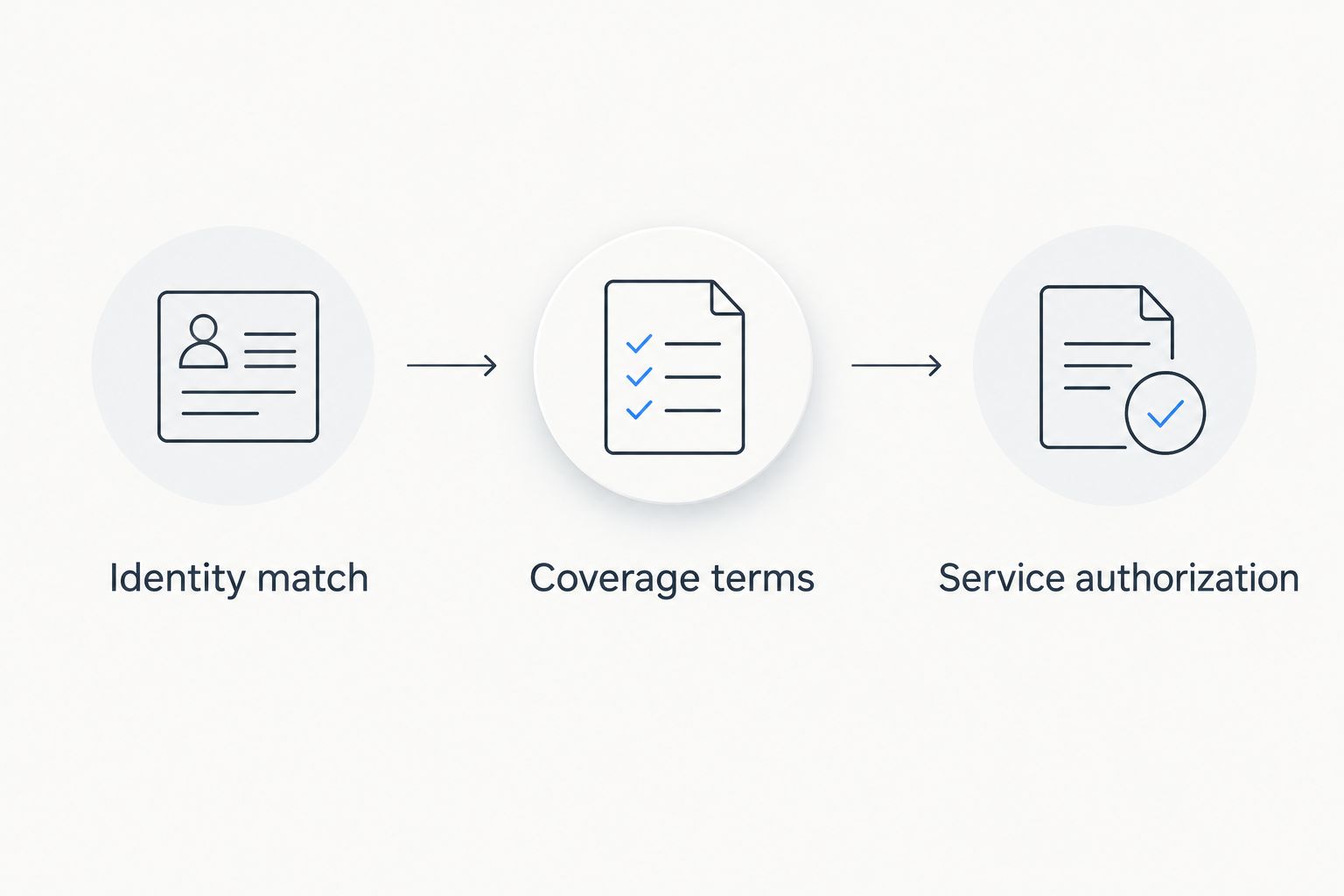
Ownopedia’s appliance warranty workflow helps you organize these checkpoints; it does not replace a manufacturer’s claim assessment. Its practical benefit is a traceable record, while its limit is equally clear: organized documents cannot establish coverage that the applicable terms exclude.
Service handoff record
- Create a service summary. Include the full model and serial numbers, symptom description, purchase evidence, applicable warranty document, and coverage response. Keep sensitive account credentials out of the summary.
- Record the authorization scope. Note whether the administrator authorized inspection, repair, or another specific action. Do not treat permission to diagnose as permission to replace components.
- Confirm the provider before booking. Follow the administrator’s service instructions. If you already have a preferred technician, ask whether that provider is accepted before the appointment.
- Save the outcome. Keep the work order, diagnosis, parts information supplied by the technician, and completion document. Attach any written explanation of a denial or unresolved issue.
- Update the appliance record. Add the actual service date and final disposition. A lookup completed in 2026 remains useful later only if the saved documents explain what happened after the lookup.
Expected result: the service provider receives a consistent account of the problem, and you retain evidence of what was authorized and completed.
For multiple rental appliances, connect this record to your appliance maintenance for landlords process. Keep each appliance’s identifiers and documents separate, even when identical models occupy different units.
Repeat the lookup when ownership or service status changes
A second useful workflow starts when you acquire a used appliance, receive it with a home, or discover an existing repair record. Here, the trigger is a change in ownership or documentation rather than a new failure.
- Capture the appliance identity again. Match the physical label to any documents you received. Do not assume a folder left with the property belongs to the appliance currently installed.
- Check transfer conditions. Read the applicable warranty terms and ask the administrator whether coverage transfers under your circumstances. Ownership of the appliance and eligibility under its warranty are separate questions.
- Update the owner record. Follow the manufacturer’s process if an ownership update is required. Changing an account entry does not, by itself, extend or reinstate coverage.
- Save a fresh confirmation. Request the coverage status applicable to the new circumstances and preserve the response. Keep the previous record rather than overwriting it.
Best for: used-appliance buyers and new homeowners. This variant exposes mismatched documents before a breakdown, but it cannot supply missing purchase evidence or guarantee transferable coverage.
Troubleshooting
The serial number is rejected
Compare your entry against the original photograph, checking leading zeros and model-versus-serial confusion. Follow the form’s formatting instructions. If the verified identifier still fails, send a readable label image through official support rather than repeatedly altering characters.
The appliance appears, but the coverage date is wrong
Submit the purchase documentation and ask which event the displayed date represents. Request a corrected record or a written explanation. Do not use a manufacture-date decoder to overwrite a purchase-based coverage date.
Registration succeeded, but coverage is still unclear
Registration records and coverage decisions answer different questions. Retrieve the applicable warranty and ask support about the reported failure, including any inspection requirement. Preserve the registration confirmation without labeling it a claim approval.
The receipt is missing
Search your retailer account, email, and delivery records, then ask the seller for a duplicate purchase document. Ask the warranty administrator which alternative evidence it accepts. A payment entry alone does not identify the appliance or establish all purchase details.
The label is damaged or inaccessible
Check existing purchase, installation, or service documents for identifiers, then ask the manufacturer how to verify them. Do not guess a serial number or move a connected appliance unsafely. For gas odor, smoke, or exposed wiring, prioritize safety and qualified assistance over finishing the lookup.
Customize your workflow
Create a reusable appliance-record template with identification, purchase evidence, warranty terms, symptoms, authorization, and service outcome. Keep an unedited copy of every source document alongside your summary so another person can check your interpretation.
For a 2026 household inventory, prioritize appliances with unreadable labels or missing documents. Use calendar reminders only for deadlines explicitly stated in the applicable paperwork; do not invent renewal or registration requirements.
Ownopedia recommends documenting coverage before starting repair work. You can describe symptoms and gather records without opening the appliance. Electrical measurements and internal inspection require a separate safety decision, not merely a completed warranty lookup.
FAQ
Can I check an appliance warranty with just the serial number?
A serial number can help identify an appliance, but it does not by itself prove warranty eligibility. Use the manufacturer’s process and provide purchase evidence when required.
Where do I find my appliance serial number?
Find the serial number on the appliance’s rating label, using the owner’s manual to locate it. Do not remove service panels or move a heavy connected appliance unsafely to reach the label.
Is the model number the same as the serial number?
No. The model number identifies the model, while the serial number identifies an individual appliance. Record both exactly as printed.
Does registering an appliance activate its warranty?
A registration confirmation is not, by itself, proof of warranty coverage. Check the applicable warranty terms and ask the manufacturer what registration changes in your circumstances.
Can I claim an appliance warranty without a receipt?
Ask the warranty administrator which alternative purchase evidence it accepts. First request a duplicate receipt or order record from the seller; acceptance depends on the applicable process and terms.
Does a warranty transfer when I buy a used appliance?
Transferability depends on the applicable warranty terms and purchase circumstances. Obtain confirmation from the manufacturer or administrator rather than relying on the previous owner’s status screenshot.
Should I book a technician before checking warranty coverage?
Confirm the required service process before booking warranty work. Ask whether the provider must be authorized and whether approval covers inspection, repair, or both.
One last thing
Save the original label photograph, not just your typed serial number. If an identifier is rejected later, the photograph lets support review the actual characters and appliance information instead of relying on another transcription.