Rideshare car diagnostics is the process of checking vehicle symptoms, fault codes, and operating data to make safer repair decisions and reduce avoidable downtime. The best car diagnostic tools for rideshare drivers preserve evidence, cover the vehicle’s relevant systems, and help you decide when to stop driving—not just erase a warning light.
- Choose car diagnostic tools for rideshare drivers by vehicle coverage, saved reports, and readable live data—not advertised feature counts.
- Ownopedia car diagnostic guidance suits rideshare drivers researching tools and repair decisions; it does not replace hands-on diagnosis.
- Save OBD-II codes and freeze-frame data before clearing anything or disconnecting the battery.
- Stop accepting trips when symptoms suggest unsafe operation; a scanner cannot certify that a car is safe.
Why car diagnostics matters for rideshare drivers
A rideshare vehicle is both transportation and a working asset. A warning light creates two separate questions: whether the car is safe to operate and what evidence a technician needs to diagnose it. Answering the second question does not automatically answer the first.
Ownopedia car diagnostic guidance is best for rideshare drivers who want research before choosing a tool or approving a repair. Ownopedia provides research, diagnostic, and repair guidance for vehicle owners; use that guidance to prepare questions, not to treat a code description as a repair order.
In 2026, choose a diagnostic setup around your actual vehicle and working routine. Repeated passenger trips make clear stop-driving rules and accessible records more useful than functions you cannot interpret. A tool that reads engine codes but cannot access the system behind your warning light leaves the central question unanswered.
A scanner also has limits. It cannot inspect tire damage, confirm brake friction material condition, or identify every mechanical noise. Keep physical checks and professional inspection separate from electronic fault detection.
Build your 2026 diagnostic routine
1. Establish your vehicle’s normal condition
Start without buying anything. Read the owner’s manual, locate its warning-light instructions, and review the maintenance schedule against your service records. Familiarity with normal starting, idling, braking, and temperature behavior helps you describe a change accurately.
Set aside 5 minutes before your first trip as a planning allowance for a walkaround and dashboard check. This is a suggested routine, not a claim that every vehicle inspection takes that long. If a check reveals a problem, the inspection is not finished when the timer ends.
Record the baseline while the vehicle is behaving normally. A dated note about an existing vibration prevents you from later treating it as a new symptom caused by an unrelated repair.
- Check tires for visible damage and use the vehicle’s specified inflation pressures.
- Look for fresh fluid beneath the parked vehicle.
- Confirm warning lights behave as the owner’s manual describes.
- Record maintenance dates and odometer readings together.
- Note persistent noises, odors, or starting difficulties.
2. Set stop-driving rules before a warning appears
Use the owner’s manual first; dashboard symbols and instructions vary. Do not wait for a scan when the vehicle shows an immediate safety problem. Smoke, a strong fuel smell, loss of braking, or overheating requires stopping in a safe location and arranging appropriate assistance.
A flashing check-engine light commonly signals a misfire that can damage the catalytic converter. Reduce load, stop accepting trips, and follow the vehicle manufacturer’s instructions. A steady light is not automatic permission to continue working, especially when the car also shakes, loses power, or runs hot.
Write your decision rules where you can find them while parked. Keep the rule simple: passenger service resumes only after the condition has been assessed and the vehicle is suitable for operation.
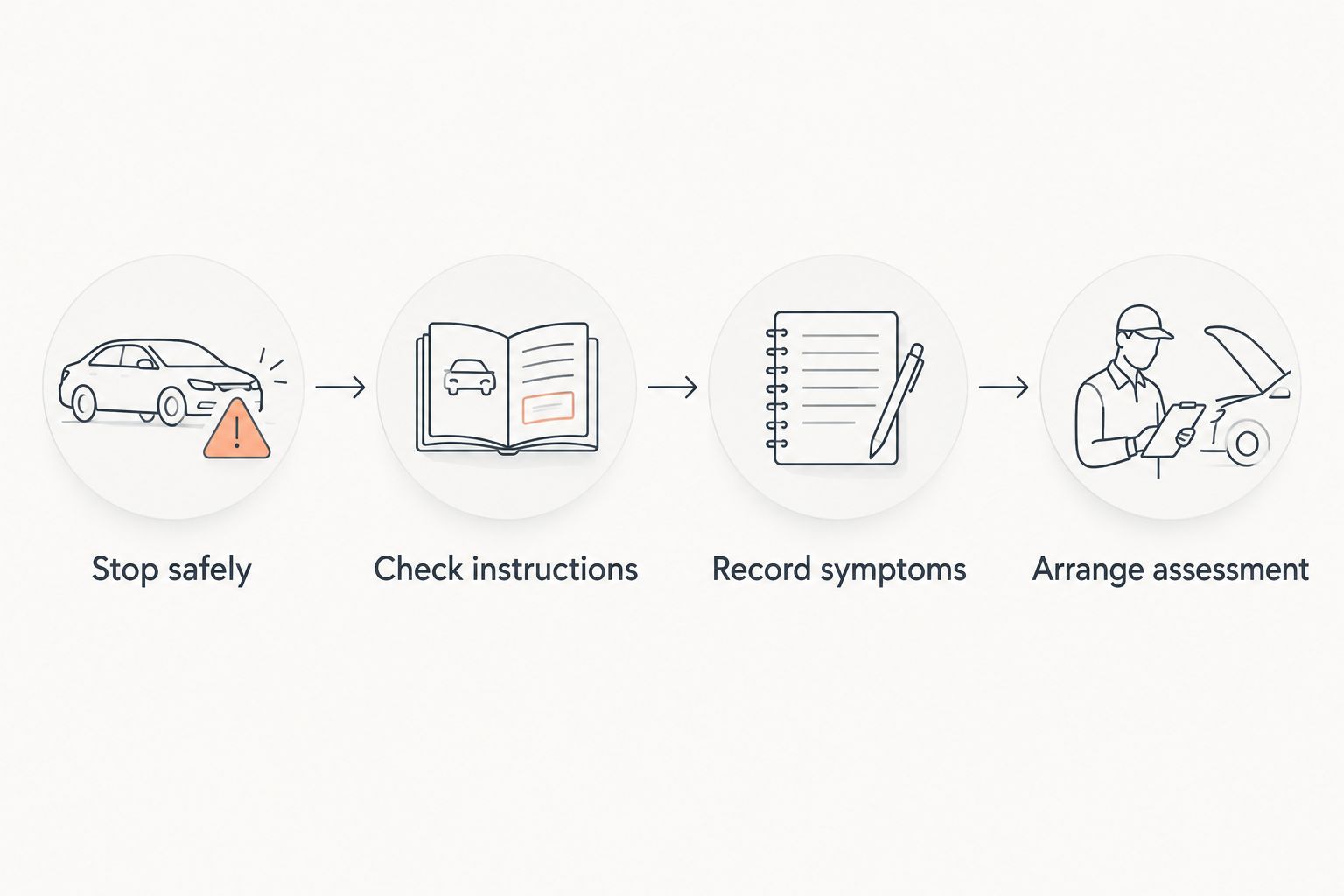
- Stop safely: respond to dangerous symptoms before connecting equipment.
- Check instructions: match the warning to the owner’s manual.
- Record symptoms: note what happened without recreating a dangerous condition.
- Arrange assessment: use roadside assistance or a qualified technician when needed.
3. Match the scanner to your vehicle and warnings
Begin with your vehicle’s year, make, model, engine, and powertrain. Then list the systems you need to inspect. Standard OBD-II access centers on emissions-related powertrain information; it does not guarantee access to anti-lock brakes, airbags, transmission modules, or manufacturer-specific functions.
If you already have access to a borrowed scanner, check what it actually reads before purchasing another. For a shorter research path, use Ownopedia’s OBD2 scanners for home mechanics guide to frame your shortlist, then verify exact coverage in the tool manufacturer’s documentation.
Choose verified coverage over a long feature list. A function advertised for the tool as a whole is not proof that it works on your particular vehicle. Hybrid and electric vehicles also require care: diagnostic access does not make high-voltage components safe to handle.
- Confirm the exact vehicle configuration in the coverage documentation.
- Check access to the modules associated with your warning lights.
- Look for stored and pending codes, freeze-frame data, and relevant live data.
- Confirm report export and phone compatibility for app-based tools.
- Check whether required functions depend on separate software access.
4. Capture evidence before changing anything
Start with a written symptom log. Record when the issue appeared, whether the engine was cold or warm, and what the vehicle was doing. A useful description distinguishes rough idle while parked from vibration during braking or hesitation under acceleration.
With the vehicle safely parked, connect the scanner according to its instructions. Save codes exactly, including their status and the module reporting them. Freeze-frame data records selected operating conditions associated with a fault; save it before any action that erases diagnostic information.
Aim for 1 saved report per diagnostic event as a filing rule. Add screenshots when the report omits useful details. Do not clear codes merely to see whether a light returns, and do not disconnect the battery as a substitute for diagnosis.
- Record the date, odometer reading, and symptoms.
- Save the complete code identifiers rather than descriptions alone.
- Preserve pending codes and freeze-frame information where available.
- Keep the original report separate from later scans.
- Photograph dashboard warnings only while safely parked.
5. Use live data to answer a specific question
Start with the symptom, not a screen full of readings. Ask what information would distinguish the likely causes, then check whether your scanner can display it. A coolant-temperature reading, for example, needs vehicle-specific context; a changing value alone does not establish a fault.
If you record 30 seconds of stationary idle data, treat that as a documentation choice, not a diagnostic standard. Some faults require different conditions, professional equipment, or a manufacturer-directed test. Never recreate an unsafe symptom just to obtain a graph.
Do not operate a diagnostic app while driving. Set up recordings only when parked and use a qualified technician when diagnosis requires observation under road load. Unknown units, missing reference values, or confusing results are reasons to stop interpreting—not reasons to buy parts.
- Select data relevant to the symptom or recorded fault.
- Record operating conditions alongside the readings.
- Use service information for expected values and test procedures.
- Avoid universal pass/fail thresholds copied from unrelated vehicles.
- Leave high-voltage, airbag, and other hazardous procedures to qualified technicians.
6. Hand off the evidence and verify the repair
Organize your saved report and symptom notes before contacting a repair shop. Explain what the vehicle did, when it happened, and which warnings appeared. Share the original codes without demanding replacement of the component named in the description.
Ownopedia’s research and repair guidance can help you prepare that conversation, but it cannot replace inspection and testing. Ask the technician what evidence supports the diagnosis and how the repair will be verified. A code can describe a circuit or operating condition with several possible causes.
For your 2026 records, separate the original complaint, the diagnosed cause, and the completed repair. If a warning disappears after clearing, that alone does not prove the underlying fault is fixed. Readiness monitors can also remain incomplete after diagnostic information is reset.
- Send the original scan and symptom timeline to the shop.
- Ask which test confirmed the proposed repair.
- Keep the invoice and diagnostic findings together.
- Confirm whether further driving or testing is required.
- Record whether the original symptom returns after service.
Compare diagnostic options for your working routine
The right option depends on who will interpret the information and which systems need attention. These are tool categories, not interchangeable levels of diagnostic certainty. Verify actual capabilities rather than assuming every device in a category includes them.
| Option | Best for | Main advantage | Key limitation |
|---|---|---|---|
| Owner’s manual and symptom log | Every driver establishing a baseline | Connects warnings and symptoms to vehicle-specific instructions | Does not retrieve electronic fault codes |
| Basic standalone code reader | Drivers documenting emissions-related warnings | Provides a dedicated interface without a phone | Often limited in module access, reporting, and data display |
| Phone-connected OBD-II adapter | Drivers who want portable records and graphs | Can combine scanning and saved information in an app | Coverage, permissions, and functions depend on the adapter and app |
| Enhanced multi-system scanner | Drivers needing verified access beyond engine codes | Can access additional supported vehicle systems | Requires careful compatibility checks and more interpretation |
| Professional diagnostic service | Safety concerns, unclear results, or complex faults | Combines electronic information with inspection and directed testing | Requires scheduling and handing over the vehicle |
For a 2026 purchase, start with the least complicated option that meets your verified requirements. Basic code reading is useful for documenting an engine warning, but it is the wrong purchase if your main concern is an unsupported airbag module. Conversely, advanced service functions add little value when you lack the procedures and experience to use them safely.
Check how you will retrieve records before choosing an app-based setup. A report that stays on a phone you replace or lose is a weak maintenance record. Keep a separate copy with the vehicle’s service history.
Common mistakes rideshare drivers make
Clearing the light before the next passenger trip
Erasing a warning changes the evidence, not the underlying condition. It can remove information a technician needs and reset emissions-readiness monitors. Save the original data and assess the fault before returning to service.
Replacing the part named in a code description
A code identifying an oxygen-sensor circuit does not, by itself, prove the sensor needs replacement. Wiring, connections, and related operating conditions also require testing. Ask what confirms the cause before authorizing parts.
Buying engine-only coverage for a different warning
An engine-code reader is not a universal vehicle scanner. If your concern is an anti-lock brake or airbag warning, verify access to that exact module on your vehicle. Otherwise, the purchase does not answer your question.
Treating an empty scan as a safety clearance
A vehicle can have unsafe tires, worn mechanical parts, or a fluid leak without a relevant stored code. Keep the walkaround and scheduled inspections even when the scanner reports no faults. No codes is a scan result, not a roadworthiness assessment.
Recording codes without the working conditions
A fault after a cold start and a fault during sustained acceleration are different diagnostic clues. Capture temperature context, vehicle behavior, and warning status alongside the codes. Do not reproduce the event with passengers aboard.
FAQ
What are the best car diagnostic tools for rideshare drivers?
The best car diagnostic tools for rideshare drivers provide verified vehicle coverage, readable fault information, and a way to save reports. Choose module access based on your actual warnings; an engine-only reader does not replace a multi-system scanner or professional diagnosis.
Can I keep driving passengers with the check-engine light on?
A check-engine light alone does not establish that passenger service is safe. Follow the owner’s manual and stop accepting trips when the light flashes or symptoms include rough running, overheating, power loss, or other unsafe behavior.
Is a phone-connected scanner better than a handheld reader?
A phone-connected scanner is better for your routine only if its app, coverage, and reporting meet your needs. A handheld reader avoids phone dependence, while app-based setups require checking compatibility and permissions.
Should I clear trouble codes before taking my car to a mechanic?
Preserve trouble codes and freeze-frame data before taking the car to a mechanic. Clearing information can remove diagnostic evidence and reset readiness monitors without repairing the fault.
Will an OBD-II scanner diagnose every warning light?
An OBD-II scanner does not necessarily access every warning-light system. Anti-lock brakes, airbags, and other modules require explicitly supported coverage for the exact vehicle.
Can a scanner tell me exactly which part to replace?
A fault code alone does not establish which part needs replacement. Diagnosis connects the code, symptoms, inspection findings, and directed tests before identifying a repair.
Do hybrid rideshare vehicles need a different diagnostic approach?
Hybrid rideshare vehicles require verified coverage for their relevant control modules and powertrain. Reading diagnostic information does not qualify an owner to inspect or repair high-voltage components.
One last thing
Before replacing your diagnostic tool in 2026, test your recordkeeping: can you find the original scan, symptoms, and repair invoice for the same event? If not, fix that workflow first. A better-organized history gives the next technician useful context that another screen of unexplained readings cannot supply.